
With BeepMate, you can send WhatsApp messages (and files) to your WhatsApp or to a WhatsApp group, using GET or POST calls (RESTful API).
Go to the BeepMate chat and type the API command, it will generate an API key for you.
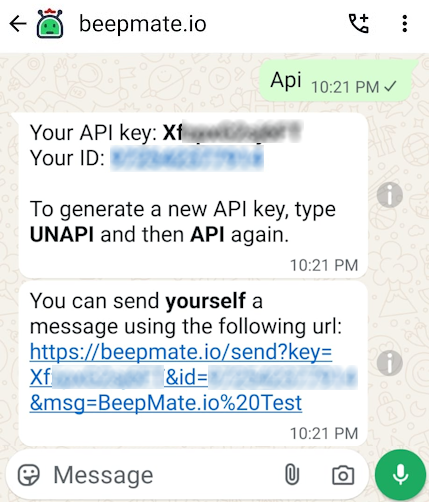
Using your WhatsApp ID and API key you can send WhatsApp notifications. The ID is your phone number in international format without the plus sign (e.g., 19291111111 for a US number).
Send a text message using GET use the following URL:
https://beepmate.io/send?key=YOUR_KEY&id=YOUR_ID&msg=MESSAGE
Replace YOUR_KEY and YOUR_ID with the details you received from the API command, and MESSAGE with the notification you wish to send.
MESSAGE part. See URL encoding for more information. For example, %20 represents a space so if your URL has MESSAGE=Hello%20World it will notify "Hello World" in the notification.
With POST you can send files to WhatsApp.
The following examples uses curl command, which is available on Linux and Windows (You may need to install it if it does not exist).
curl -k -X POST -F "file=@/path/somefile.pdf" -F "msg=YOUR_MSG" -F "key=YOUR_KEY" -F "id=YOUR_ID" "https://beepmate.io/send"
Replace YOUR_KEY and YOUR_ID with the details you received from the API command, and change the path and filename to the location and file that you wish to send.
For example:
curl -k -X POST -F "file=@c:\somefile.pdf" -F "msg=nice file" -F "key=MyKey" -F "id=19291111111" "https://beepmate.io/send"
file form field, as shown in the above example.